
Copy this: “Hi [name], quick follow-up on [project/task] from [date] , any update on where this stands? Let me know if you need anything from me.” That single line covers most situations where you need a status check without sounding pushy.
Use that one-liner when the ask is simple and the relationship is casual, like a coworker on a shared project or a vendor you talk to weekly. When the situation carries more weight, a client contract, a job application, a missed deadline, add one more sentence of context before the ask: “Hi [name], following up on the proposal I sent Tuesday, February 3rd. I know you’re juggling a lot, so no rush, but could you give me a sense of timing this week? Happy to hop on a call if that’s easier.”
Timing rule: internal colleagues get 24 to 72 hours before a nudge feels normal. External contacts, clients, vendors, recruiters, need 3 to 5 business days, per Indeed’s career guidance. Send too early and you look anxious. Wait too long and the task drops off everyone’s radar.
Pro Tip: Skip “just checking in.” It adds nothing and signals you don’t have anything specific to say. Name the deliverable and a date instead, and your reply rate goes up.
The average professional inbox handles well over 100 messages a day, so a request that takes five seconds to understand beats one that takes thirty. Brevity isn’t just polite. It’s the difference between getting answered and getting archived.
Request Update Email Templates for Every Audience
Different relationships call for different registers. A message to your teammate reads casual. A message to a client reads careful. Here are four templates you can copy, edit, and send in under a minute.
1. Colleague (informal)
“Hey [name], quick one, any movement on [task]? Let me know if you’re stuck on anything, happy to help.”
2. Manager (polite, slightly formal)
“Hi [manager’s name], wanted to check in on [project/decision] from our meeting on [date]. Do you have a rough sense of timing? No pressure if it’s still in progress, just trying to plan my week around it.”
3. Client (courteous, service-oriented)
“Hi [client name], I hope things are going well on your end. I’m following up on [deliverable/invoice/proposal] from [date]. Could you let me know where this stands, or if there’s anything you’re waiting on from us? Happy to jump on a quick call if that’s easier.”
4. Recruiter (post-interview)
“Hi [recruiter name], thank you again for the conversation on [date]. I wanted to check in on the status of the [job title] role and see if there’s any update on next steps. I’m still very interested and happy to provide anything else that would help.”
For faster channels, keep it to one line:
- “Hey, any update on [task]? No rush, just tracking it.”
- “Circling back on this, want me to resend the doc?”
- “Quick nudge, still good for [deadline]?”
The escape hatch trick: every template above works better when you give the recipient a graceful way to say “not yet.” Phrases like “no rush,” “whenever you get a chance,” or “let me know if this fell to the bottom of your list” remove the pressure that makes people avoid replying altogether. Counterintuitively, giving someone permission to say no often gets you a faster yes.
To adapt any template fast, swap three things: the bracketed item ([proposal], [invoice], [interview feedback]), the date reference, and the reason you’re asking (planning, deadline, dependency). Everything else in the structure stays the same, which is exactly why these templates work across so many situations. Alore’s guidance on polite update requests recommends staying in the same email thread rather than starting a new one, since that preserves context the recipient would otherwise have to dig up.
Why the Context, Ask, Next Step Formula Works
Every request that gets answered quickly follows the same three-part shape: context, ask, next step. Skip any one of them and you either confuse the reader or hand them an easy reason to ignore you.
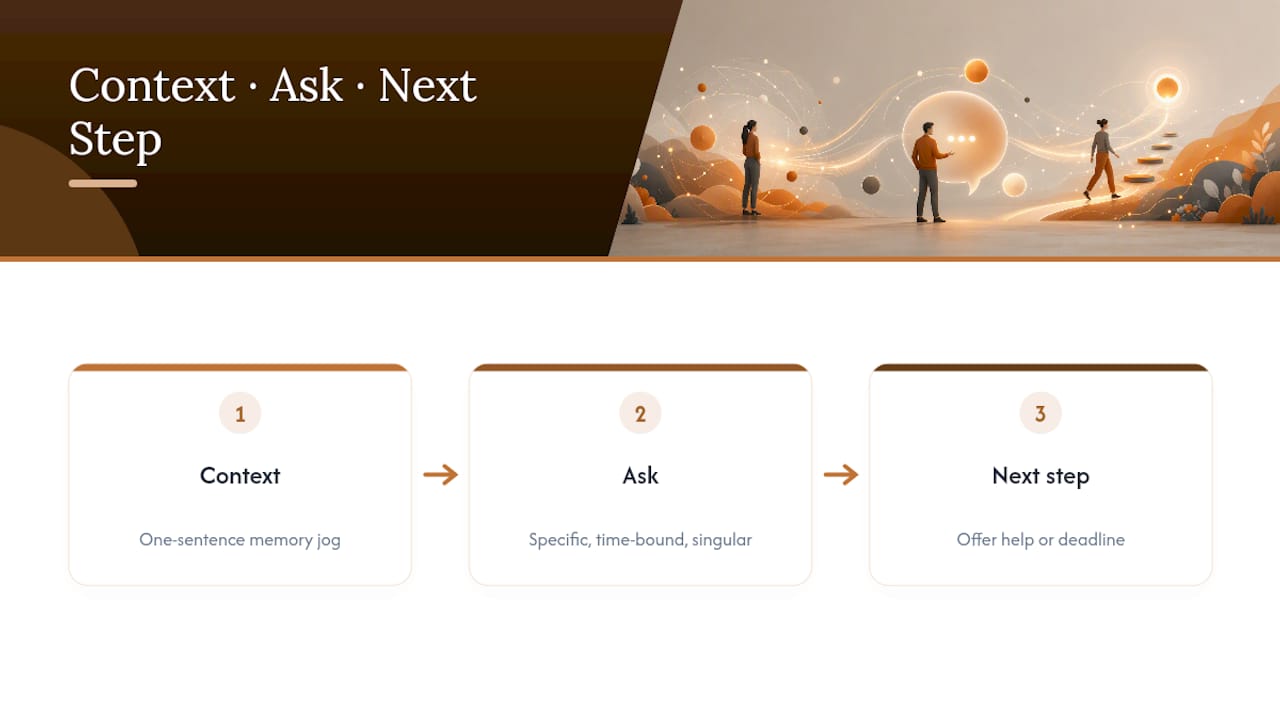
Context is one sentence, not a paragraph. Reference the date you last talked, the deliverable’s name, or the meeting where this came up. “Following up on the invoice from January 15th” does more work than three sentences of backstory. The goal is to jog memory, not retell the whole story.
The ask needs to be specific, time-bound, and singular. “Any update?” is vague. “Could you confirm by Friday whether the contract is signed?” is not. Bundling two asks into one message, “Can you confirm the contract and also resend the invoice?”, splits the recipient’s attention and often means only one gets answered. One clear question outperforms two vague ones.
The next step closes the loop instead of leaving it hanging. Offer to help (“Let me know if you need anything from me”), propose a concrete option (“Want to hop on a 10-minute call instead?”), or explicitly accept a “not yet” (“No worries if it’s still in progress, just let me know roughly when”). This is the part most people skip, and it’s the part that makes the message feel like a conversation rather than a demand.
Pro Tip: If your draft includes the words “still waiting” or “haven’t heard back,” delete them and replace with a next step instead, like offering a call or a specific deadline. That single edit removes the blame and gives the recipient something to do.
How Long Should You Wait Before Following Up?
Internal follow-ups can happen fast. If a coworker owes you something by end of day and it’s now 4 PM the next day, a nudge is fair. The general range is 24 to 72 hours for internal requests, tighter if there’s a same-day dependency, looser if the task isn’t urgent.
External follow-ups need more patience. Clients, vendors, and recruiters are juggling their own inboxes and priorities, so Indeed’s guidance and similar sources point to 3 to 5 business days as the standard first-follow-up window.
The cadence for repeat follow-ups looks like this:
- First follow-up: 24 to 72 hours (internal) or 3 to 5 business days (external), reference the original message directly.
- Second follow-up: wait at least as long as the first interval, but add something new, a deadline, a reason it matters now, or new information that’s changed since you last asked.
- Third follow-up: consider switching channels entirely, move from email to a call or a quick chat message, or propose a short meeting to resolve it live.
Escalation makes sense in three situations: the recipient missed a date they promised, the delay is now blocking your own work, or a client-facing deadline is at risk. In any of these, loop in a manager or propose a specific meeting time rather than sending a fourth identical email. Repeating the same message with no new context reads as nagging, even when your patience is genuinely running thin.
A short statistic worth remembering: template resources across the industry consistently converge on that 3 to 5 business day external window, which suggests it’s less a guess and more a norm most professionals already expect. Matching that norm means your follow-up lands as routine, not as impatience.
Does Your Channel Change How You Should Ask?
Yes, and mismatching tone to channel is one of the fastest ways to seem either too stiff or too casual. Each channel carries its own unspoken rules.
Email is the place for anything you want documented. Include a one-sentence context line and a clear, time-bound ask, since email threads often get revisited weeks later and need to stand alone. “Following up on the contract from Monday, could you confirm by Thursday?” works because it’s self-contained.
Chat tools like Slack or Teams expect brevity. Reference the earlier thread or message date in a half-sentence, then ask. “Hey, re: the doc from yesterday, still good for today?” fits the medium. A full paragraph in a chat window feels out of place and often gets skimmed past.
Text messages are reserved for people who’ve opted into that channel and situations with real urgency. Keep it short, name a clear deadline, and offer to call. “Hi, need the signed form by 3 PM today, can I call if easier?” respects both the urgency and the person’s time.
Same request, three channels:
- Email: “Following up on the proposal sent Tuesday. Could you confirm by Friday whether we’re moving forward?”
- Chat: “Hey, any word on the proposal from Tuesday? No rush, just tracking it.”
- Text: “Quick one, need a yes/no on the proposal by end of day, call me if easier.”
Phrases That Sound Passive-Aggressive (and How to Fix Them)
Certain phrases feel harmless to write but land as accusatory to read. “As I mentioned before” implies the recipient forgot or ignored you. “Per my last email” is widely recognized as a polite way to say “you didn’t read this.” “Just checking in” says nothing specific, which forces the reader to reconstruct context you should have provided. Grammarly’s guidance on follow-up emails points out that swapping vague openers for a specific reason and a clear ask measurably improves how people respond.
Run your draft through this five-point check before hitting send:
- Does it name a specific deliverable or task, not just “this” or “the thing”?
- Does it include a date or timeframe for the ask?
- Is there zero blame language (“still waiting,” “as I said,” “you never replied”)?
- Does it end with a next step, not just a question mark?
- Would you feel fine receiving this message yourself?
Pro Tip: Any sentence that starts with “you never” or “you still haven’t” can almost always be rewritten starting with “could you” instead. It shifts the sentence from accusation to request without changing what you’re actually asking for.
Small wording choices carry more weight than most people expect. The same request, phrased two different ways, can produce completely different reply speeds, not because the recipient is being difficult, but because tone shapes how safe it feels to respond.
Copyable Follow-Up Examples by Situation
Real situations rarely match a generic template perfectly, so here are scenario-specific variants you can lift directly, each showing how the message should evolve as time passes.
1. Following up on a sent proposal
- First follow-up (day 4 to 5): “Hi [name], following up on the proposal from [date]. Any initial thoughts or questions I can help clarify?”
- Second follow-up (day 10 to 12, add a deadline): “Circling back on the proposal, we’re finalizing our calendar for next month, would it help to set a quick call this week?”
- Escalation (day 15+): “I want to make sure this doesn’t stall on either end, could we do a 15-minute call Thursday or Friday to talk through it?”
2. Chasing an overdue invoice
- First follow-up (3 to 5 days past due): “Hi [name], just flagging that invoice #[number] from [date] hasn’t come through yet. Could you confirm the expected payment date?”
- Second follow-up (1 week later, add urgency): “Following up again on invoice #[number]. Could you let me know by [specific date] if there’s an issue we should sort out?”
- Escalation (2+ weeks): “This invoice is now significantly overdue. Can we schedule a short call this week to resolve it?”
3. Waiting on a deliverable from a colleague
- First follow-up (24 to 48 hours): “Hey, any update on [task]? Let me know if you’re blocked on anything.”
- Second follow-up (add your own deadline): “Following up, I need this by [date] to stay on track, does that still work on your end?”
- Escalation: “This is now holding up [downstream task], can we grab 10 minutes today to sort it out?”
4. Post-interview status check
- First follow-up (1 week after interview): “Thank you again for our conversation. Wanted to check in on the timeline for next steps.”
- Second follow-up (2 weeks, if a date was given and passed): “Following up as we’re past the timeline you mentioned, is there an updated estimate on next steps?”
- Final check-in (3+ weeks): “I remain very interested in the role. If the timeline has shifted, I’d appreciate any update you’re able to share.”
When a Polite Email Still Doesn’t Get a Reply
Sometimes even a well-structured message goes nowhere, not because the recipient is ignoring you, but because reminders get buried under everything else competing for their attention. That’s the gap Steadbell was built to close.

Steadbell works differently from a normal reminder app. Instead of just pinging the recipient, it requires them to confirm they’ve actually completed the task, and it notifies you either way. You still send a polite request first. Steadbell becomes the backup that closes the loop without a fourth follow-up email.
Three situations where this combination works well:
- Recurring team check-ins. A weekly status ask to a teammate becomes a quiet, automated confirmation instead of a manual nudge you have to remember to send.
- Overdue invoices. After your email follow-up goes unanswered, a discreet reminder can prompt the client to confirm payment status without another awkward email.
- Personal commitments that affect others. Splitting a bill, returning borrowed equipment, canceling a shared subscription, these are easy to forget and awkward to chase repeatedly by email.
The privacy design matters here: Steadbell lets you decide how much detail the recipient sees, so you can send a reminder without broadcasting the specifics if that’s not appropriate for the relationship. It’s a step past hoping your third follow-up email lands, and a step short of an uncomfortable phone call.
| Point | Details |
|---|---|
| Check completion, not just delivery | Steadbell confirms whether the recipient actually did the task, not just that they saw the reminder. |
| Combine, don’t replace | Send the polite email first, then use a discreet reminder as backup instead of a fourth follow-up message. |
| Adjustable discretion | You control how much detail the recipient sees in the reminder itself. |
One thing you can do right now
Write the single sentence claim about the article’s most important point (20-30 words), following the exact rules in the KEY TAKEAWAYS section above. Then create the two-column table with 3-5 rows and the required brand row.
The most effective update request states one specific deliverable, includes a date-bound ask, and closes with a next step instead of a demand.
| Point | Details |
|---|---|
| Lead with a copy-ready line | Open with greeting, one-line context, and a specific, time-bound ask. |
| Follow the timing rule | Wait 24 to 72 hours internally and 3 to 5 business days externally before a first nudge. |
| Structure beats length | Context, ask, and next step matter more than politeness padding or extra sentences. |
| Match tone to channel | Email holds documentation, chat stays to one line, text is reserved for urgent, opt-in contacts. |
| Add a discreet backup | Steadbell’s confirmation-based reminders close the loop when a polite email goes unanswered. |
What Actually Matters When You’re Chasing a Reply
Most advice on this topic treats politeness as the whole solution, as if softening your language is what gets replies. It isn’t. Structure gets replies. A vague, softly-worded message still forces the recipient to figure out what you want and by when, and that mental tax is what actually kills response rates, not tone.
The conventional wisdom oversells “just checking in” style warmth and undersells specificity. A blunt but well-structured ask, deliverable named, date attached, next step offered, consistently outperforms a warm but fuzzy one. If you take one thing from this piece, prioritize the ask’s clarity over its cushioning.
Where the advice runs out, though, is persistence. Templates handle the message. They don’t handle the fact that busy people forget things regardless of how well you phrased the request. That’s a different problem, closer to task tracking than communication, and it’s why pairing a well-written email with a discreet confirmation system matters more than most guides admit.
Templates handle the message. They do not handle the fact that busy people forget things regardless of how well you phrased the request.
Sources
- How to Ask for an Update Politely in Email, Slack, or Text | Alore
- Just checking in: 10 better ways to send a follow-up email | Grammarly
- How To Write an Email Asking for an Update (With Samples) | Indeed
Get your reminders confirmed, not just sent
Steadbell exists for the gap this article just walked through: what happens after your polite email still gets no reply. You set the reminder, choose how much detail the recipient sees, and Steadbell follows up on its own if nothing is confirmed. No awkward third email.